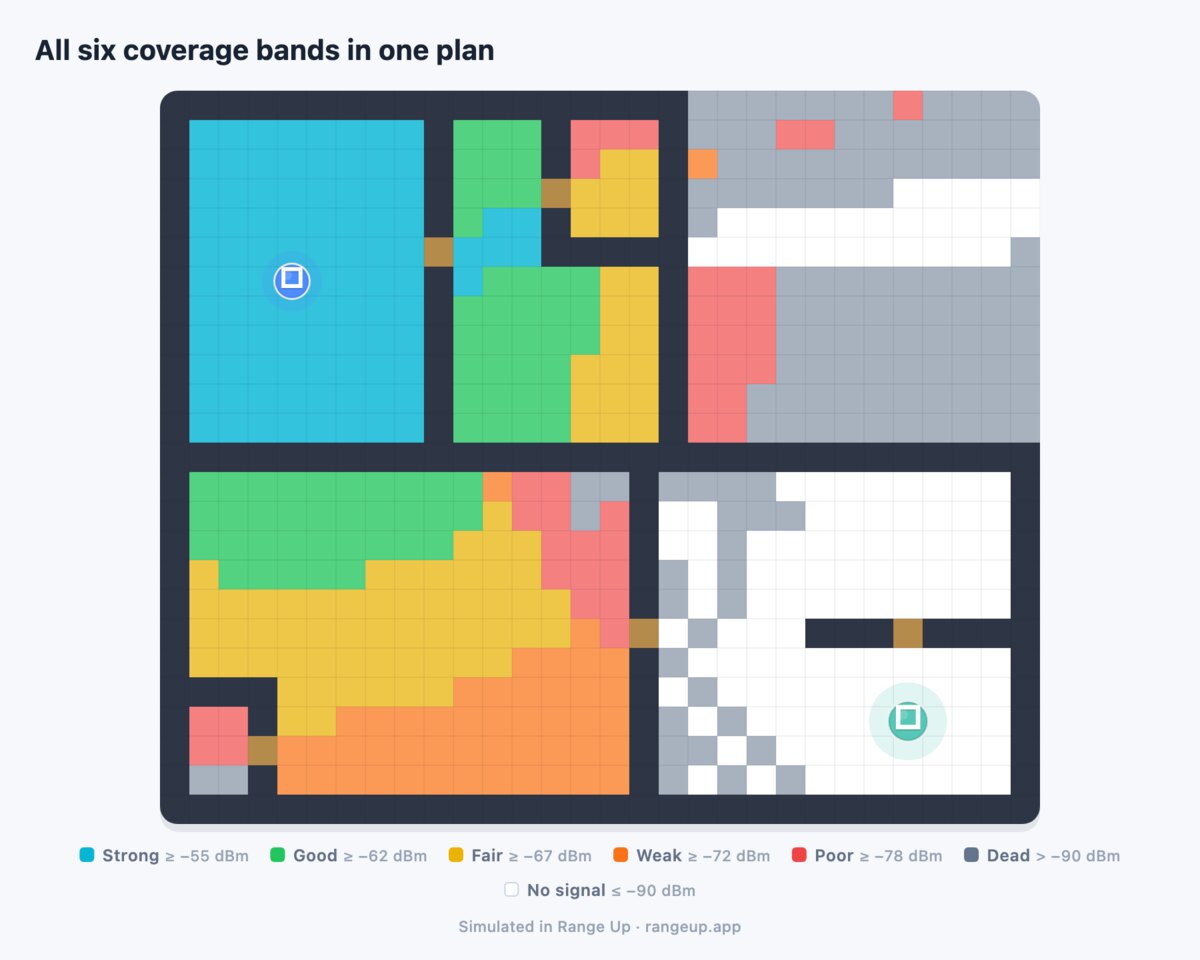
How to Read the Range Up Coverage Heatmap
Wi-Fi heatmap explained in plain dBm: what each color band on the Range Up map means, how good a room needs to be for calls or 4K, and how to spot a wall shadow.
The map fills in and your house turns into six colors. Cyan around the router, a smear of orange down the hallway, gray in the back bedroom. The useful question is not which color is prettiest — it is which of them you are allowed to ignore.
Every color on the Range Up heatmap is a signal band in dBm, and every band has a consequence. Here is what each one covers, what counts as good enough per activity, and how to tell a room an extender will rescue from one it will not.
What the heatmap is showing#
The map is a prediction, not a measurement. Range Up takes the walls you drew, the material preset and loss values you set, and the spot you put the router, then computes the signal that should arrive at every square of the plan. It never touches your live network: no scanning, no SSID list, no speed test.
That trade is the point. A measurement tells you what the back bedroom reads today. A prediction tells you what it would read if the router moved to the hallway, or if a node went in the landing outlet — without walking the house five times.
The cost is that the map only knows geometry. It cannot see your neighbor's Wi-Fi, a microwave, a weak laptop antenna, or an ISP having a bad evening. And it is confidently wrong in one specific way: tell it the walls are drywall when they are brick and the map turns optimistic in exactly the direction you do not want. Materials matter more than room sizes — see telling Range Up about your walls.
The six colors, in dBm#
The legend along the canvas shows six chips: Strong, Good, Fair, Weak, Poor, Dead. Here is the band behind each one.
| Chip | Color | Signal band | What that means for the room |
|---|---|---|---|
| Strong | Cyan | -55 dBm and above | Same room as the router, or a clear line to it. Nothing to fix here |
| Good | Green | -55 to -62 dBm | Comfortable at full speed. 4K, calls, uploads, several devices at once |
| Fair | Yellow | -62 to -67 dBm | Works today with no headroom left. One closed door takes it down a band |
| Weak | Orange | -67 to -74 dBm | Marginal. Browsing and music are fine; calls stutter, 4K buffers, games spike |
| Poor | Red | -74 to -84 dBm | Connects and barely works. High retry rates, stalls, drops as you move |
| Dead | Gray | -85 dBm and below | Effectively dead. Devices cling or fail to associate |
Squares with no color are not open floor — walls and doors draw as their own tiles.
Two properties of that scale change how you read it:
- It is banded, not a gradient. A square at -66.9 dBm is yellow and its neighbor at -67.1 dBm is orange. Do not read a single-square color change as a cliff.
- Each step through the usable range is only about 5 to 7 dB — roughly the cost of one interior stud wall, which is why a room flips color when you add a partition you barely think of as an obstacle. The bands widen to 10 dB at the bottom, where the differences stop mattering. The per-material numbers are in the per-material loss table.
The boundary that matters most is yellow to orange, at -67 dBm. That is the line the app uses to count weak squares in the stats, and the same number that decides where an extender belongs. The full scale is in the dBm reference table.

Good enough depends on what the room is for#
A map with no context invites you to chase cyan everywhere, which wastes money. What you want is the lowest color each room can live with.
| What happens in the room | Lowest color to accept | Why that line |
|---|---|---|
| Home office, daily video calls | Green | Calls fail on consistency, not bandwidth. 1.5-3 Mbps each way, zero tolerance for retries |
| 4K TV or console streaming | Green | Needs 15-25 Mbps sustained, and buffering is the first symptom of retries |
| Competitive gaming | Green | Only 3-6 Mbps, but jitter-sensitive. Orange is playable and miserable |
| Security camera uploading | Green | Sustained upstream is the hardest job on a home network |
| Laptop, browsing, music, phones | Yellow | A few Mbps. Retries at this level are invisible |
| Smart plugs, sensors, doorbell | Orange | Tiny payloads, but they need a stable association to stay online |
| Garage or patio, just want a signal | Orange | Anything above dead is a win out here |
The rule that falls out: stop when every room that matters is green. Turning green into cyan is how people end up with three radios competing for the same airtime and a worse network than they started with.
Wall shadows have a shape#
Color alone tells you how bad a spot is. The shape of the color tells you why, and that is what decides the fix.
A wall shadow is a wedge. It starts at the wall, widens with distance, and has a hard straight edge that lines up with something you drew. When the color changes abruptly along a line that matches a wall, you are looking at attenuation, not distance.
Distance falloff looks nothing like that. It is smooth and roughly concentric, with no straight edges. Across open space, signal drops about 6 dB every time the distance doubles, so a big open room typically drifts one band from end to end — not three.
Doorways show as a bright fan. A door costs a small fraction of what the wall around it costs, so signal squirts through the opening and spreads on the far side. Draw a doorway that does not exist and you invent coverage too.
Two diagnostics for your own plan. A shadow far bigger than expected usually means the wall loss is set too heavy — stud partitions running on the Brick preset, or a preset that does not match your construction. A room worse in real life than on the map usually means something is missing from the drawing: a mirrored closet door, foil-backed insulation, or a masonry chimney drawn as a normal partition.
The payoff is the decision. If your problem room sits inside a hard-edged shadow, the fix is geometric — move the router or the node so the path runs through the doorway instead of the wall, and you can win 10 dB for free. If it sits at the far edge of a smooth gradient, geometry has nothing left to give and you need a second radio.
A marginal room and a dead room need different fixes#
Both feel like bad Wi-Fi from the couch. On the map they are completely different problems.
Marginal is yellow or orange, roughly -62 to -74 dBm. The room connects, holds, and disappoints you. This is precisely what an extender is for: a well-placed one realistically lifts the target 10 to 20 dB, which is two or three bands — orange becomes green.
Dead is red or gray, below about -74 dBm. The room is not short a little signal, it is short a path. Look at what surrounds it before you decide anything:
- Dead room, but the route to it still shows green or yellow somewhere. There is a place to stand a repeater, and the app can find the spot.
- Dead room with red and gray all around it too. Nowhere has both a solid link back to the router and reach into the room. No placement solves that. Move the router first, then look at a wired drop or a mesh node with real backhaul.
The check takes one glance: look at the colors on the path, not at the dead room. A candidate position needs to sit in the green-to-yellow range — roughly -60 to -67 dBm from the router — because that is its backhaul, the reasoning in the halfway rule and where it breaks. If nothing on the path beats orange, an extender will rebroadcast a weak signal strongly and your devices will cling to it.
Five passes to read a map properly#
Work the plan in this order instead of staring at the whole thing.
- Check the router. The squares around it should be cyan for a few cells in every open direction. If not, you have drawn a wall on top of it or set a material too heavy.
- Trace the yellow-to-orange line. Everything inside it is fine today. Everything outside is your real problem list, and it is usually shorter than it looks.
- Name the rooms outside that line and what they are used for. Most will not matter. The one that does is the reason you opened the app.
- Look at the shape of the fall-off into that room. A hard straight edge means a wall problem geometry can fix. A smooth gradient means a distance problem that needs a second radio.
- Find a green-or-yellow spot on the path between the router and that room. If one exists, an extender has somewhere to stand. If nothing on the path beats orange, stop shopping and read what actually causes a dead zone.
Only then run the placement search — and judge the result by the change in the one room you named, not by how much of the plan turned green.
Reading it on your own plan#
Everything above is a reading skill, and it only pays off on a map of your own house. Once a plan has walls, materials and a router on it, the legend down the side of the canvas turns the whole floor into the six bands above and the stats count how many squares sit under -67 dBm. Mark the room you actually care about, let Range Up work through its candidate positions for that one room, and then judge the winner on a single question: how many bands does the target square move in the side-by-side coverage check? Two bands is a purchase. Half a band is a saved receipt. The colors are predicted rather than measured, so confirm the winner in the real room once the hardware is in. What to do with a position once the map has named it lives on the extender placement hub, and the app is a free download.
Frequently asked questions#
What do the colors on a Wi-Fi heatmap mean?
On the Range Up map, cyan is -55 dBm and above, green is -55 to -62, yellow is -62 to -67, orange is -67 to -74, red is -74 to -84, and gray is -85 dBm and below. Each step through the usable range is roughly 5 to 7 dB, about the cost of one interior stud wall. Anything from yellow upward is usable; orange and below is where video calls and 4K start failing.
What signal strength do I need for video calls?
Aim for green, which on this map means -62 dBm or better, in any room where you take calls regularly. An HD video call needs only 1.5 to 3 Mbps each way, but it is ruined by retransmissions rather than by low bandwidth, so headroom matters more than raw speed. Yellow works right up until someone closes a door between you and the router.
Is -70 dBm bad Wi-Fi?
It is the orange band: usable for browsing, email and music, unreliable for video calls, 4K streaming and gaming. At that level the radio is stepping down its rate ladder and re-sending packets, so throughput falls much faster than the signal number suggests. It is the classic marginal room, and the classic case where a well-placed extender genuinely helps.
Why does a room change color along a perfectly straight line?
That is a wall shadow. The simulation traces a straight path from the router to each square and subtracts the loss of everything it crosses, so a wall produces a wedge of weaker signal with a hard edge behind it. A straight color boundary means attenuation from a specific obstacle, while a smooth concentric fade means plain distance.
Does the Range Up heatmap measure my real Wi-Fi?
No. It is a simulation built from the floor plan you draw, the wall materials you set, and the router position you mark. It does not scan for networks, does not read your signal strength, and does not run speed tests. That is what makes it able to compare positions you have not tried yet, and why you should verify the result in the real house afterward.
My map shows gray in a room, but my phone works there. Why?
The map is a single-band picture, and 2.4 GHz usually reads 4 to 8 dB stronger than 5 GHz at the same spot while giving up roughly half as much to each wall, so it reaches rooms the faster band cannot. A room the map paints gray can still hold a slow 2.4 GHz connection, which is exactly the situation where you get bars and nothing loads. Real rooms also have reflections off metal and glass that a straight-line model does not credit.
How much should the map improve after I add an extender?
A meaningful fix lifts the target room by 10 to 20 dB, which is two or three color bands — orange to green. If the best candidate the search can find lifts your target by less than about 10 dB, or leaves it orange, the map is telling you that placement is not your constraint and an extender is the wrong purchase.